Under the guidance of Apple's simple design concept, the interfaces of the MacBook series products have been streamlined. After switching from the old MacBook to the new one, many users will encounter difficulties in connecting devices. The new MacBook abandons the traditional USB ports and only retains the powerful but limited USB-C ports, which makes it a challenge to directly connect USB devices. In order to expand the device connection capabilities and meet the charging needs, equipping the MacBook with additional USB-C adapters or hubs has become a solution for many users.
Understanding the USB-C port of MacBook
In recent years, MacBook has fully transitioned to USB-C ports, which significantly reduces the number of interfaces while significantly improving the functionality of a single port. Compared with the traditional USB-A port, USB-C supports reversible cable insertion, and does not need to be carefully aligned like USB-A when using it, which greatly improves the convenience of use. In addition, the data transmission speed of the USB-C port is also much faster than that of the USB-A port, which makes efficient data interaction possible.
Features and limitations of USB-A ports
Once upon a time, USB-A ports were widely used on MacBooks and all kinds of computers. However, it does not support reversible plugging and unplugging, and requires precise alignment to work properly, which is inconvenient. In terms of data transfer speed, USB-A ports are also much inferior, but due to its long-term and widespread use, there are still a large number of devices that rely on USB-A interfaces on the market, such as common flash drives, some external hard drives, etc., which makes USB-A ports still play a role in some scenarios.
Functions of USB 3 ports
The USB 3 port is designed in a USB-A shape and can adapt to various accessories with USB-A interfaces. It can not only power some microphones and USB devices, but also facilitate data transfer between iPhones, iPads, and MacBooks. However, if you want to connect a monitor or webcam, the performance of the USB 3 port is not the best choice.
Advantages of Thunderbolt ports
The Thunderbolt 3 port has amazing transfer speeds and excellent compatibility, supporting HDMI, Ethernet, and DisplayPort connections. It is worth mentioning that the Thunderbolt 3 port can also charge the MacBook and output a mini DisplayPort video signal at the same time, which brings great convenience to users. The Thunderbolt 2 port also performs well. It supports 4K video streaming, allowing users to write 4K videos to disk while transmitting them. It is an ideal choice for connecting external displays and high-performance external hard drives and storage devices, and the transmission speed is faster than USB and Thunderbolt 1.
Faced with the limited ports of MacBook, USB-C adapters and hubs have become key tools for expanding connections and play an important role in scenarios such as work, entertainment, and business travel.
Types of USB-C adapters
USB to USB-C adapter: This adapter has a USB-C interface on one end that can be connected to the MacBook, and a USB-A interface on the other end, allowing users to connect traditional USB-A devices such as keyboards, mice, printers, and storage drives. Although this type of adapter only provides one USB-A connector and will occupy one port on the laptop, it is simple and practical when connecting a single USB-A device.
Compact hub: It has two Thunderbolt USB-C input ports and multiple output ports of different types. Multi-port USB-C adapters belong to this category. It can provide multiple ports that can work simultaneously, making it convenient for users to connect multiple devices, such as extending monitors, connecting other USB peripherals, etc. In addition, this type of adapter is usually lightweight and easy to carry, which can easily meet the user's device connection needs whether in the office or on the go.
Port functions of adapters and hubs
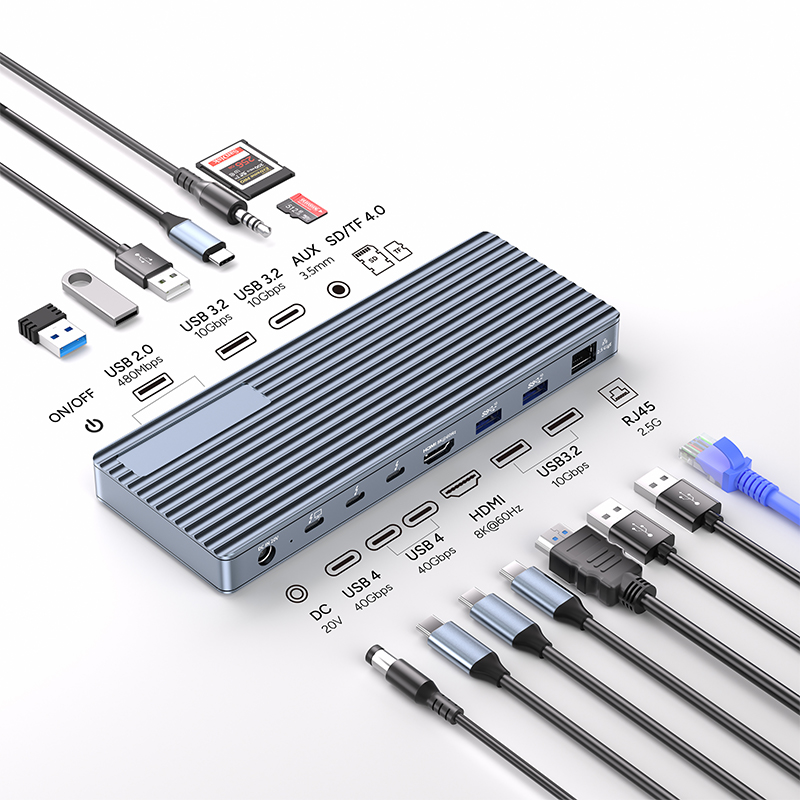
MacBook adapters and hubs have a variety of ports to meet the different needs of users. For example, the USB4 port can not only charge the device quickly, but also support connecting to an external display and achieving high-speed data transmission; the HDMI 2.0 port can be used to connect a 4K display. For users using Pro or Max M1/M2 MacBooks, this port can create a dual 4K display setup, greatly improving the visual experience. However, it should be noted that the regular M1/M2 MacBook Air can only connect to one external display due to hardware limitations. In addition, common adapters and hubs are also equipped with various ports such as USB-A, USB-C, SD and Micro SD card readers, Ethernet ports, audio jacks, etc., to fully meet the needs of users to connect different devices.
How to choose an adapted USB-C hub
Faced with the dazzling array of USB-C hub products on the market, MacBook, MacBook Pro or MacBook Air users can use the following key factors to select the most suitable product for themselves.
Material and durability
Common materials for USB-C adapters are aluminum alloy and ABS. The adapter made of all-aluminum alloy has better wear resistance and better appearance and texture. It can also conduct the heat generated inside to the surface of the product, which is conducive to heat dissipation and prolongs the service life of the device. It can be given priority when choosing.
Compatibility
Different models of MacBook have different connection options and requirements. Before buying, be sure to carefully read the MacBook user manual or visit Apple's official documentation to clarify the details of its connection functions, so as to select a USB-C hub that is fully compatible with your MacBook model. For example, some hubs may not support certain versions of the MacBook system well, and if you choose the wrong one, you may experience problems such as unstable connection or failure to recognize the device.
Data transfer speed
If your daily work or entertainment involves a lot of large file transfers and requires a high data transfer speed, you should focus on the USB specifications supported by the USB-C hub. Give priority to hubs that support high-speed data transfer, such as products that support the Thunderbolt 4 standard, which can achieve a transfer speed of up to 40Gbps, enabling fast file transfers between MacBooks and other devices, ensuring a smooth experience during work and entertainment.
Port stability
The stability of the USB-C hub port directly affects the user experience. Before purchasing, you can refer to customer reviews and feedback from other MacBook users to understand whether the product has stability problems such as loose ports and poor contact in actual use. If a hub has many negative reviews in this regard, it is recommended to choose with caution.
Return Policy and Warranty
Different manufacturers or retailers have different return policies and warranty terms for MacBook USB-C adapters. Before purchasing, be sure to understand the specific return and exchange conditions, warranty period, and warranty coverage so that you can protect your rights and interests in a timely manner when there are quality problems with the product.
Budget Considerations
The price of USB-C hubs varies greatly depending on factors such as function and brand. Choose based on your budget while meeting your own needs for the number of ports, transmission speed, compatibility, etc. Although a good hub is relatively expensive, it can increase the number of connection ports and ensure high performance when using multiple external devices at the same time, providing more convenience for work and daily entertainment. From the perspective of long-term use value, it is more cost-effective.
Maintenance points of USB-C adapters
In order to ensure that the USB-C adapter can work stably for a long time, daily maintenance cannot be ignored.
Regular cleaning
Regularly clean the connector of the adapter with a clean and soft cloth to remove dust and other impurities that may accumulate on it. Dust accumulation may affect the contact performance of the interface, resulting in unstable connection or abnormal data transmission.
Environmental protection
Avoid exposing the USB-C adapter to extreme temperatures, humidity, or direct sunlight. Extreme temperatures may affect the performance of the electronic components inside the adapter, humidity can easily cause short circuits, and direct sunlight may accelerate the aging of the outer shell material. Different USB-C adapters may have their own unique usage and maintenance requirements. Be sure to refer to the user manual that comes with the product and follow the correct usage and maintenance methods.
Summary
In modern digital office and life, for users of the latest Mac laptops equipped with USB-C ports, a high-quality USB-C adapter or hub is an indispensable accessory. It can effectively expand the functions of MacBook, connect to external displays, transfer data, charge multiple devices, and connect to different types of devices, significantly improving workflow and improving work efficiency. Because each user uses different peripherals and their needs vary from person to person, you need to fully consider your actual situation when choosing. By choosing the right USB-C hub, users can build an efficient digital ecosystem, give full play to the full potential of MacBook, and make work and entertainment more convenient and efficient.